Features Showcase How it Works Install App Pricing FAQ Contact Get Started
Now available as a PWA on all devices

Find the Perfect Anchorage,
Every Time.

Real-time anchorage analysis that combines wind intelligence, fetch calculation, and shelter scoring — all on an interactive map. Anchor with confidence, stay confortable.

Comfort Score 0–100
Real-time Weather Data
Works on iOS, Android & Desktop
AnchorComfort app
100
Point Comfort Score
3
Devices per Subscription
20
Saved Favorite Spots
24/7
Real-time Weather Data
How it Works

From Map Tap to Safe Anchor in Seconds

No expertise required. AnchorComfort guides you through every step so you can focus on sailing.

1
📅

Set Your Dates

Select your arrival and departure date and time window for analysis.

2
🗺️

Tap on the Water

Click anywhere on the map where you'd like to anchor — ocean, lake, or river.

3

Wait a Moment

AnchorComfort fetches live weather and analyzes the shoreline profile automatically.

4
📊

Read Your Score

Get your comfort score (0–100) with full breakdowns of wind, fetch, and shelter.

5

Save Your Spot

Add favorites, rename them, and batch-compare multiple anchorages at once.

Features

Everything You Need to Anchor with Confidence

Sophisticated analysis tools wrapped in a simple, intuitive interface designed for sailors at every level.

🗺️

Interactive Map Analysis

Click anywhere on the water — ocean, lake, or river. Works with Standard, Satellite, and Topo map views including nautical charts via OpenSeaMap.

📊

Comfort Score (0–100)

Your single most important number. A visual score ring instantly tells you how comfortable and protected an anchorage will be — with a plain-language explanation.

🌬️

Wind & Weather Intelligence

Live wind speed, gusts, direction, and a visual compass. Know exactly what the wind is doing and where it's coming from, right now and in the hours ahead.

🛡️

Shelter & Fetch Analysis

Advanced directional exposure calculation shows exactly which sectors are exposed and which are protected. Fetch calculates wave-building distance automatically.

⏱️

Time-Based Forecasting

Scroll through an hour-by-hour timeline to identify the best anchoring windows, worst conditions, and plan overnight stays with confidence.

Favorites & Comparison

Save up to 20 anchor spots, rename them, and re-analyze anytime. Batch-compare multiple favorites automatically to find the best option.

Position Optimizer

Not happy with your score? The position optimizer suggests a nearby location with better protection and a higher comfort score — instantly.

🧠

Navigator's Smart Advice

Context-aware recommendations flag safe conditions, issue warnings, and highlight danger periods so you always know what to watch for.

🌍

Multilingual Support

Available in English, French, and Spanish so every sailor gets information in their own language. More languages coming soon.

Product Showcase

Beautifully Designed.
Powerfully Accurate.

Every view in AnchorComfort is crafted to give you the right information at the right time.

Interactive Map

The Whole Picture, at a Glance

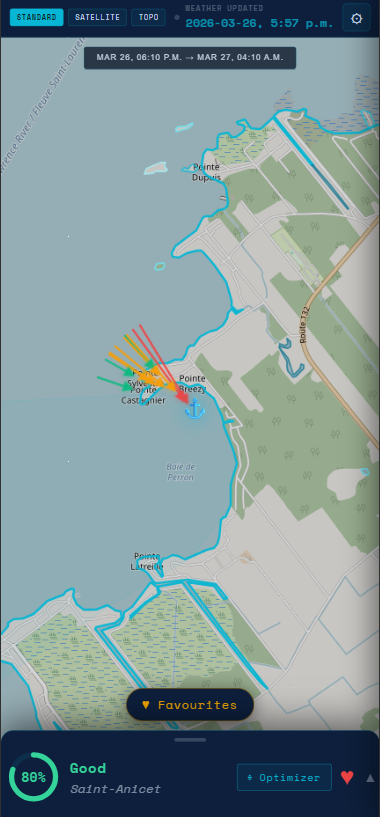
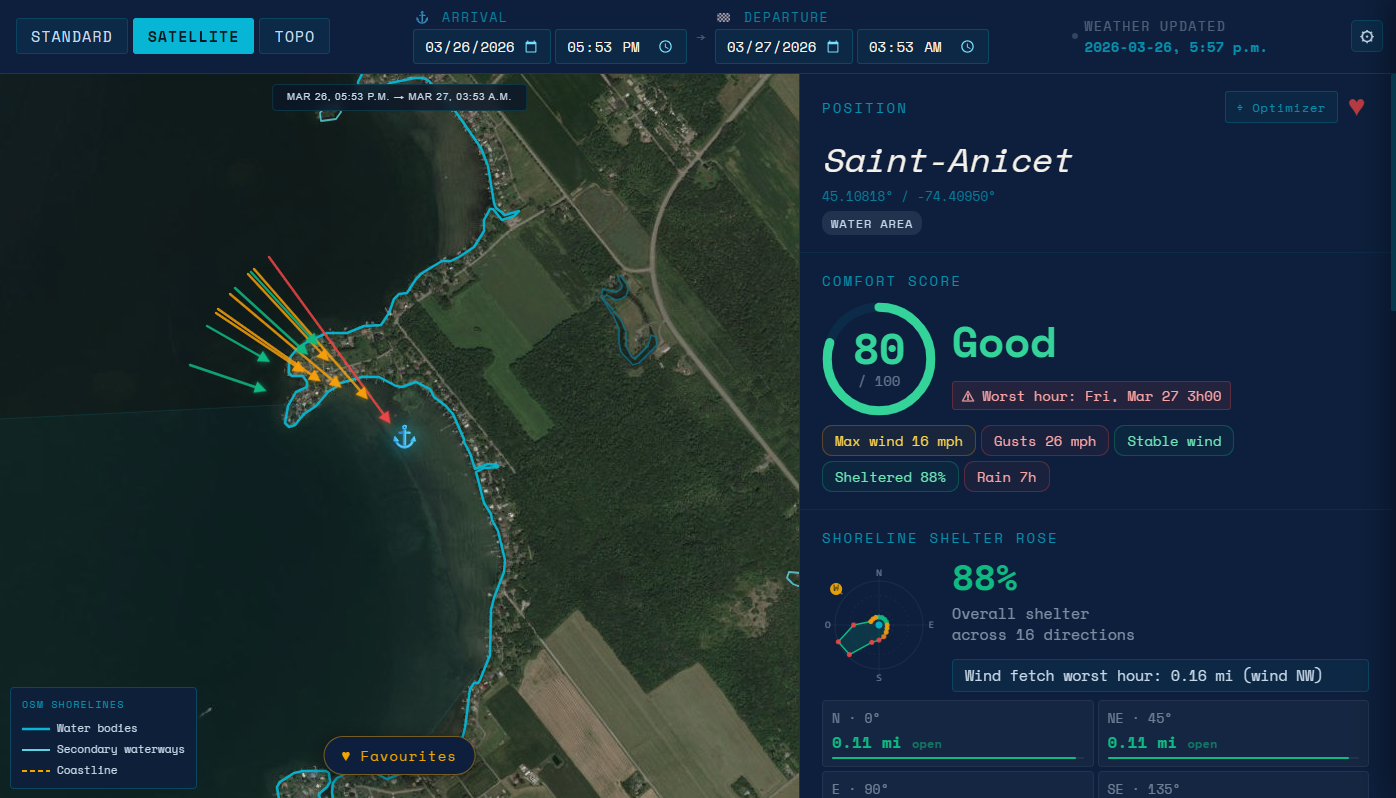
Navigate an interactive map with real nautical overlays (If available in OpenSeaMap). Tap any point in the water to instantly begin analysis — the map is your command center.

  • Standard, Satellite, and Topo map layers
  • Nautical charts via OpenSeaMap
  • Works on oceans, lakes, and rivers worldwide
  • Powered by OpenStreetMap and Overpass API
AnchorComfort app
Comfort Score

One Number That Tells the Whole Story

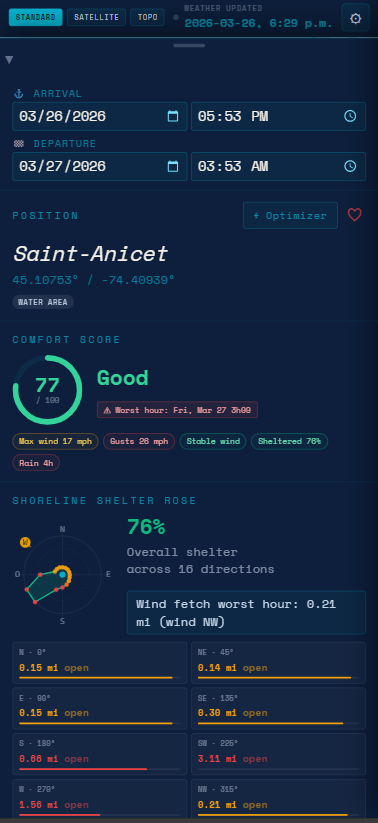
The comfort score is your single most important data point. Combining wind, fetch, gusts, and shelter into a 0–100 rating with a clear visual ring and navigator's advice.

  • Instant visual score ring with color feedback
  • Good / Warning / Danger labeling
  • Hour-by-hour timeline view
  • Worst values and average factor breakdown
AnchorComfort app
Favorites System

Build Your Personal Anchorage Library

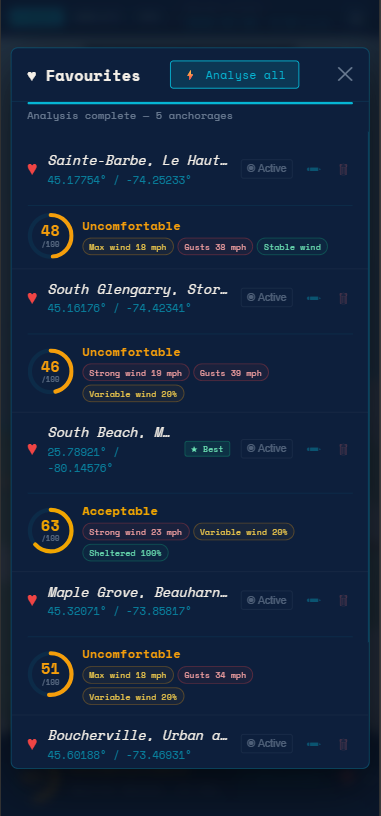
Save your best spots, rename them for easy recall, and let AnchorComfort automatically re-analyze and rank them so you always choose the best option.

  • Save up to 20 anchor locations
  • Custom naming and organization
  • One-tap batch analysis and ranking
  • Exclude spots from batch comparisons
AnchorComfort app
Detailed Forecast

Hour-by-Hour Clarity, Period by Period

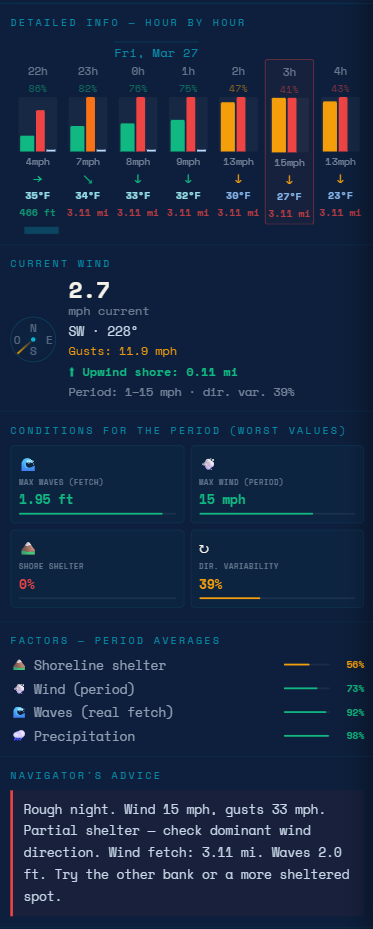
Dive deep into the full forecast window. Scroll through every hour, inspect the worst conditions expected across any period, and read a plain-language Navigator's Advice — so you know exactly what the night holds before you set the anchor.

  • Hour-by-hour wind speed, gusts & direction
  • Worst-case values flagged across any time range
  • Factor averages — wind, fetch, shelter & gusts
  • Navigator's Advice: plain-language anchoring guidance
AnchorComfort app
Why AnchorComfort

Built for Sailors Who Care About Safety

The sea doesn't forgive poor decisions. AnchorComfort turns complex environmental data into clear, actionable guidance.

Avoid Dangerous Anchorages

Know before you drop the anchor. AnchorComfort flags exposed, high-fetch locations that could put you and your vessel at risk — especially overnight.

🌙

Sleep Better at Anchor

Choose spots with confidence. A high comfort score means calm water, good shelter, and a restful night — not worrying about dragging your anchor at 3am.

🌬️

Understand Wind Impact Instantly

Fetch is the silent threat most sailors overlook. AnchorComfort automatically calculates how much wave energy is building on the water and shows it clearly.

🧭

Make Confident Decisions Fast

No need to cross-reference charts, weather apps, and your own calculations. Everything you need is in one screen, ready in seconds.

Install the App

Works Like a Native App — No App Store Needed

AnchorComfort is a Progressive Web App (PWA). Install it directly from your browser on any device. Up to 3 devices per subscription.

1

Open Safari or Chrome

Navigate to navitechautomation.ca/anchorcomfort in Safari or Chrome on your iPhone or iPad.

2

Tap the Share Button

In Safari, tap the Share icon (box with an upward arrow) at the bottom of the screen. In Chrome, tap the three-dot menu at the top right.

3

Add to Home Screen

Scroll through the share sheet and tap "Add to Home Screen". Confirm by tapping "Add" in the top right corner.

4

Launch from Home Screen

Tap the AnchorComfort icon on your home screen. The app opens full-screen, just like a native iOS app.

AnchorComfort
Add to Home Screen
Tap ↑ then "Add to Home Screen"
1

Open Chrome on Android

Navigate to navitechautomation.ca/anchorcomfort using Google Chrome on your Android phone or tablet.

2

Tap the Three-Dot Menu

Tap the three vertical dots (⋮) in the top-right corner of Chrome to open the browser menu.

3

Install App

Tap "Add to Home screen" or "Install app" from the menu. Confirm installation when prompted.

4

Open from Home Screen

Find AnchorComfort in your app drawer or home screen. It launches as a standalone app with full-screen experience.

AnchorComfort
Install App
Tap ⋮ then "Add to Home screen"
1

Open Google Chrome

Visit navitechautomation.ca/anchorcomfort in Google Chrome on Windows, macOS, or Linux.

2

Look for the Install Icon

In Chrome's address bar, you'll see a computer screen icon (⊕) or a download icon on the right side indicating the app can be installed.

3

Click "Install"

Click the install icon and then "Install" in the dialog. AnchorComfort will be added to your applications and taskbar.

4

Launch as a Desktop App

Open AnchorComfort from your desktop shortcut or app launcher. It runs in its own window without browser chrome — just like a native app. Note: desktop counts as one of your 3 devices.

💻
Desktop App
Install via Chrome for a full desktop app experience. Works on Windows, macOS, and Linux.
Pricing

Simple, Transparent Pricing

One subscription, all features. No hidden fees. Secure payments powered by Stripe.

Unlimited
Full access to every feature.
$24,95
CAD / year
Billed annually · Cancel anytime
Features
  • Full comfort score with breakdowns
  • Hour-by-hour timeline forecasting
  • Fetch & shelter sector analysis
  • Position optimizer
  • 20 saved favorites + batch compare
  • Navigator's smart advice
  • Up to 3 devices
🔒 Secure payments via Stripe
Cancel anytime
📱 3 devices included
Instant access

Your subscription remains active until the end of the billing period, even if cancelled early.

Security & Trust

Your Safety. Our Priority.

AnchorComfort is built with your privacy and security at the core — both on the water and online.

🔒

Stripe-Powered Payments

All transactions are handled by Stripe, a globally trusted payment platform used by millions. Your payment details are never stored on our servers — ever.

🛡️

Privacy First

We only collect the data necessary to provide the service. Your location data is used for analysis only, processed locally, and never sold or shared with third parties.

🌐

Open, Reliable Data Sources

AnchorComfort uses trusted open-source weather and map data — Open-Meteo, OpenStreetMap, Overpass API, Nominatim, and OpenSeaMap — so you always get accurate results.

Powered by open, trusted data sources:
Open-Meteo · OpenStreetMap · Overpass API · Nominatim · OpenSeaMap
FAQ

Common Questions

Everything you need to know about AnchorComfort, how it works, and how to get started.

AnchorComfort is a smart anchorage analysis tool that helps sailors and boaters find the safest and most comfortable place to anchor based on real-time weather, wind, and environmental conditions. It gives you a comfort score (0–100), along with wind analysis, fetch calculations, shelter mapping, and navigator's advice — all on an interactive map.

AnchorComfort is designed for sailors, boaters, and cruisers of all experience levels who anchor in lakes, rivers, or coastal waters. Whether you're new to anchoring or an experienced offshore sailor, the app simplifies decision-making and helps you avoid risky situations.

The comfort score (0–100) combines multiple factors: wind speed and gusts, wind direction, fetch (the distance wind travels over open water creating waves), and shelter/exposure analysis. A higher score means a more comfortable, protected anchorage. The score is accompanied by a visual ring, a clear label (Comfortable / Warning / Dangerous), and detailed factor breakdowns.

Fetch is the distance wind travels over open water. The longer the fetch, the bigger the waves — even if wind speed seems moderate. A spot with 10 knots of wind but 20km of fetch can be rougher than a spot with 15 knots and only 1km of fetch. AnchorComfort automatically calculates directional fetch for you, which is what makes it uniquely powerful.

Yes. AnchorComfort includes an hour-by-hour timeline view of upcoming conditions so you can identify the best anchoring windows, anticipate worsening weather, and plan overnight stays with confidence. Simply set your arrival and departure date range before tapping your anchorage location.

Yes. AnchorComfort is a Progressive Web App (PWA), which means you install it directly from your browser — no App Store or Google Play required. It works on iPhone and iPad (Safari or Chrome), Android (Chrome), and desktop (Chrome). Each subscription allows up to 3 device installations.

AnchorComfort works on any modern device with a compatible browser: iPhone and iPad (iOS, via Safari or Chrome), Android phones and tablets (Chrome), and desktop computers running Windows, macOS, or Linux (Chrome). You can have up to 3 devices installed per subscription.

No. AnchorComfort requires an internet connection because weather data, wind forecasts, and geolocation analysis all depend on live data sources. We recommend checking conditions before heading out to a low-signal area and saving your results for reference.

AnchorComfort is offered as an annual subscription. Once you subscribe, you get immediate access to all features. You can cancel anytime — your subscription remains active until the end of the current billing period, and you won't be charged again after cancellation.

Absolutely. All payments are processed securely by Stripe, one of the world's most trusted payment platforms. Your credit card or payment details are never stored on Navitech Automation's servers — Stripe handles everything with bank-level encryption and compliance.

No. AnchorComfort is designed to complement your existing navigation tools and good seamanship — not replace them. It's a decision-support tool that provides highly relevant insight. Always use your own judgment, local knowledge, and standard safety equipment when anchoring.

To save mobile data, the shoreline profile is loaded only within a 20 km radius. Because of this limited data, the app cannot determine whether an anchor position is in water or on land — checking this everywhere would require too much data.

📩

Get in Touch

Have a question, found a bug, or have a great idea to share? We'd love to hear from you. Our team is here to help.

✉️ info@navitechautomation.ca